
Create a Webinar Registration Page That Fills Seats
Convert visitors into attendees with speaker bios, agenda breakdowns, schedule details, and reminder integration.
Template Preview
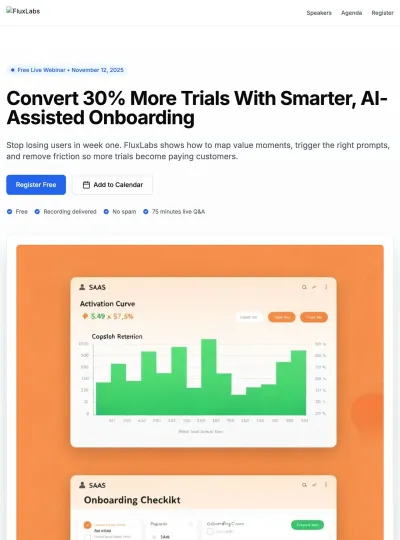
Preview the complete landing page template designed specifically for product launch.
Who It's For
SaaS companies hosting educational webinars for lead generation
Marketing teams running virtual events and product demos
Thought leaders and consultants promoting live training sessions
B2B businesses using webinars as part of their sales funnel
Nonprofits and associations hosting community education events
Problems This Solves
A webinar landing page maximizes registrations by clearly communicating the value of attending and removing friction from the sign-up process.
Maximizes registration rates with clear value propositions and simple forms
Builds credibility through speaker credentials and previous attendee testimonials
Creates urgency with live registration counters and limited-time messaging
Reduces no-shows by collecting emails for automated reminders and replays
Provides a shareable link for social media, email campaigns, and partner promotion
Captures attendee data for post-event follow-up and lead nurturing
Page Blueprint
This use case includes 6 key sections designed to guide visitors from awareness to action.
Hero
Lead with a benefit-driven headline, date and time, and a prominent registration form or CTA above the fold.
Speaker Bio
Introduce the speaker with a professional headshot, credentials, and notable achievements to build authority.
Agenda & Takeaways
Present a scannable agenda with key learning outcomes so visitors know exactly what they'll gain from attending.
Social Proof
Include attendee testimonials, sponsor logos, and a registration counter to create FOMO and credibility.
Registration CTA
Place a simple registration form (email is often enough) at multiple points throughout the page.
FAQ
Answer questions about replay availability, event duration, technical requirements, and cost.
Copy Starters
Use these as inspiration for your own copy. Customize them to match your brand voice and specific offering.
Headline
Master [Topic] in [Duration] Minutes
Subheadline
Join [Number]+ professionals already registered for this live session on [Date].
Value Bullets
Call to Action
Reserve Your Seat
Best Practices
DO
Lead with the single biggest benefit of attending in your headline
Include speaker credentials and headshots to build authority and trust
Keep registration forms minimal—email is often enough to start
Mention that a replay will be available to reduce commitment anxiety
AVOID
Avoid vague headlines like 'Webinar Announcement'—be specific about outcomes
Do not hide the date, time, or duration—make scheduling details prominent
Skip long registration forms that deter sign-ups
Never forget social proof—previous attendee quotes and sponsor logos matter
SEO Keywords
Use these keywords to optimize your page for search engines and improve discoverability.
Primary Keyword
Secondary Keywords
Long-Tail Keywords
Frequently Asked Questions
Preview this use case or generate your page now
Start with AI and customize every detail to match your brand and goals.