
2026 Landing Page Design Trends & Effective Examples
Discover the latest 2026 landing page design trends and examples that boost conversion rates. Explore practical tips and strategies using Landing-Page.
2026 Landing Page Design Trends
In 2026, landing page design is becoming simpler and more intuitive. Mobile optimization, fast loading speeds, and design elements that capture user attention are emerging as key factors that increase visitor dwell time and conversion rates.
For example, minimalist design with clean layouts, eye-catching CTA buttons, and customized images/videos naturally guide visitors toward desired actions.
By using Landing-Page, you can experiment with and apply these latest design trends directly. Adjust layouts with drag-and-drop, test CTA button colors and positions, and review your landing page structure and content strategy at a glance.
Key Elements of an Effective Landing Page
An effective landing page must include several key elements:
- Clear Goals Visitors must be clearly guided on what action to take. Examples include newsletter subscriptions, free trial applications, and product purchases. With Landing-Page, after setting goals, you can intuitively edit each section so visitors easily understand the page flow.
- Compelling Content Headlines, subheadlines, and body copy should be crafted to capture visitor interest and drive conversion. Concise, eye-catching copy plays a major role in landing page examples. Landing-Page's real-time preview feature lets you verify copy and design simultaneously while optimizing.
- Strong CTA Buttons The position, color, and copy of buttons that drive clicks directly impact conversion rates. During landing page optimization, using Landing-Page lets you A/B test button colors, sizes, and copy to find the optimal combination.
- Visual Structure and UX Layouts should be designed so visitors naturally scroll through the page and find the information they need. Using Landing-Page's layout templates and visual guides, you can design page structures that help users acquire information without confusion.
Successful Landing Page Case Studies
Case 1: Startup A
Startup A improved newsletter subscription conversion rates by 30% through landing page optimization.
- Strategy: Eye-catching header images, clear CTAs, mobile optimization
- Used Landing-Page to quickly adjust sections and buttons while testing conversion rates
Case 2: Online Education Platform B
Company B improved its landing page design to drive free trial applications.
- Strategy: Step-by-step guidance and customer testimonial placement
- Used Landing-Page's drag-and-drop editing to easily experiment with text, images, and CTA placement
Case 3: E-commerce C
Company C optimized its landing page structure for new product launch pages, increasing purchase conversion rates by 25%.
- Strategy: Product video usage, visible pricing information, clear CTAs
- Used Landing-Page to generate multiple page versions and compare performance
Landing-Page Introduction and How to Use
Landing-Page is an all-in-one tool that makes landing page creation and optimization easy. Even beginners can build landing page designs with intuitive drag-and-drop, and use various templates and sections to quickly create professional pages.
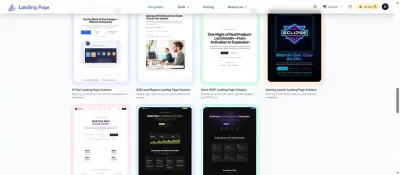
1. Template Selection
Landing-Page offers various purpose-specific templates.
- Examples: Product sales, newsletter subscriptions, event registrations, etc.
- Once you select a template, you can quickly start based on pre-configured sections and designs.
2. Section and Content Editing
- Freely add and modify text, images, buttons, videos, and more.
- In landing page examples, you can immediately adjust important CTA buttons or description copy, verifying design and content in real-time while optimizing.
3. A/B Testing Feature
- Test different designs, buttons, and copy to find the optimal combination.
- This lets you practically apply landing page optimization strategies that boost conversion rates.
4. Mobile Optimization
- Landing-Page lets you check and edit layouts on both PC and mobile screens.
- Improve mobile user experience while naturally guiding visitors toward desired actions.
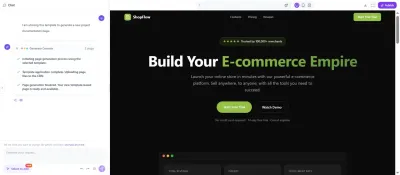
5. Real-time Preview
- Preview changes in real-time as you make them, making it easy to verify that design and content are applied as intended.
Landing Page Optimization Tips
- Leverage A/B Testing Test different designs, copy, and CTAs to find the optimal combination. With Landing-Page, you can create A/B test pages with a simple click and check results in real-time.
- Improve Page Loading Speed Loading speed directly impacts conversion rates and SEO. Landing-Page supports image optimization and caching features for fast loading.
- Mobile Optimization is Essential Mobile visitors make up a significant portion of traffic, so mobile UX-focused design is necessary. Landing-Page's mobile preview feature lets you review UX on actual screens.
- Add Trust Elements Customer testimonials, certification badges, and security indicators help visitors feel confident taking action. Landing-Page makes it easy to add sections and adjust placement.
Conclusion and 2026 Outlook
The 2026 landing page design trends center on user-centricity, simplicity, and data-driven optimization.
Effective landing pages must be designed with structures and content that naturally guide visitors toward desired actions. Using Landing-Page, you can directly apply and experiment with these latest trends to create optimal landing pages.
The future of landing pages focuses on user experience + maximizing conversion rates, and Landing-Page is the efficient tool to achieve this.
Ready to Create Your Landing Page?
Apply these insights and build high-converting landing pages in minutes with our AI-powered builder.